


MariaDB Pre Upgrade Steps
Support for MyISAM tables and MariaDB 10.6.x and below ends in June 2026 on AlmaLinux 8.
Before we can upgrade your server to MariaDB 11.8, all databases on all sites must be
using the InnoDB storage engine.
This guide explains how to:
- Back up your databases safely
- Check for MyISAM tables
- Convert them to InnoDB using phpMyAdmin in Plesk
Step 1: Back up all databases (Important!)
Before making any changes, you must take a backup.
- Log in to Plesk
- Go to Websites & Domains → Backup Manager
- Create a backup for each subscription and save a copy locally
⚠️ Do not skip this step. Changes to database engines are permanent unless restored from backup.
Step 2: Identify all databases
- A server may host multiple sites
- Each site may have more than one database
Every database must be checked.
- In Plesk, go to Websites & Domains → Databases
- Note all databases listed
- Each one must be checked individually
Step 3: Open phpMyAdmin
For each database:
- Click phpMyAdmin
- Select the database
- Open the Structure tab
The Engine (Storage Engine) column shows the type:
- InnoDB → OK, no action needed
- MyISAM → Must be converted
Step 4: Convert MyISAM tables to InnoDB
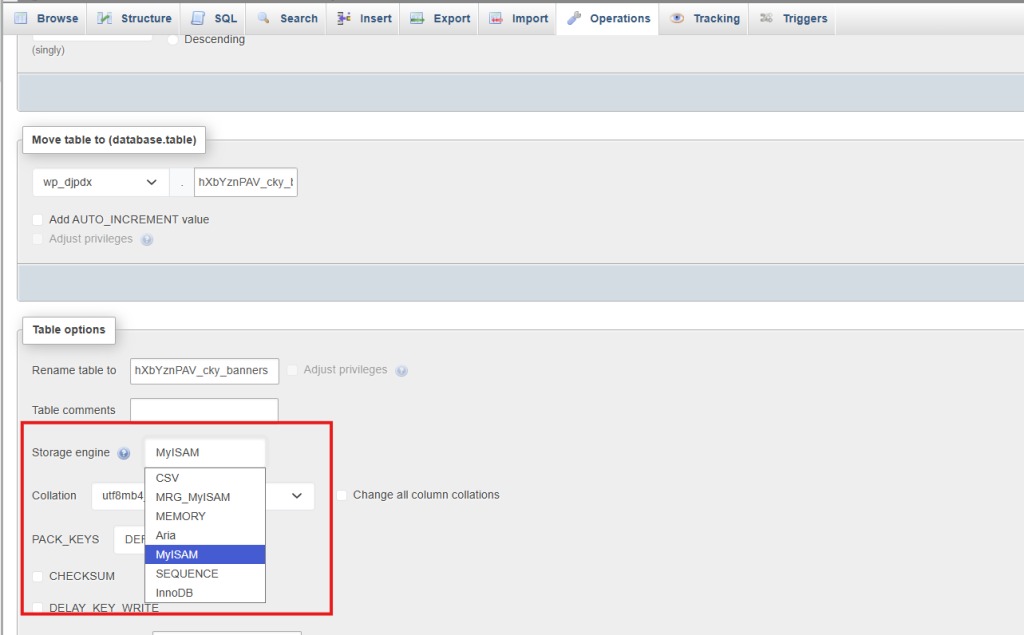
Option A – Using the phpMyAdmin interface
- Click the MyISAM table
- Click on the ‘Operation‘ tab
- Use the drop-down next to ‘Storage engine‘
- Choose InnoDB
- Click Go
See this image for guidance:
Option B – Using SQL (advanced users)
ALTER TABLE table_name ENGINE=InnoDB;
Repeat for every MyISAM table in every database.
Step 4a: Benefits of InnoDB
Switching to InnoDB provides several advantages:
- Crash Recovery & Reliability
- Supports transactions and automatic recovery if the server stops unexpectedly
- Foreign Key Support
- Maintains data integrity between related tables
- Row-Level Locking
- Only affected rows are locked, improving performance on busy websites
- Better Concurrency & Performance
- Multiple users can read and write simultaneously
- Future-Proofing
- MyISAM will no longer be supported; InnoDB continues to receive updates and security fixes
Step 5: Verify Conversion
- Refresh the Structure tab in phpMyAdmin
- Confirm all previously MyISAM tables now show InnoDB
Repeat for every database on every site.
Step 6: Check websites & restore if needed
- Visit each website and test functionality
- If issues occur:
- Go to Backup Manager
- Restore the backup made in Step 1
This ensures you can safely revert your sites to their previous state if needed.
Step 7: Contact us to schedule MariaDB upgrade
Once all tables are converted successfully:
- Contact us to confirm completion
- Schedule MariaDB upgrade to 11.8
Important information:
- Upgrade takes approx. 30 minutes
- Websites will be offline during this period
- Upgrades can be performed Monday–Thursday, 9am–5pm
Optional cleanup
If possible, remove any domains or sites no longer in use from Plesk.
This helps us complete the MariaDB upgrade efficiently.
After the upgrade
- Test all websites
- Confirm admin areas load correctly
- Report any issues promptly
If required, databases can be restored from the backups taken earlier.
✅ Notes / Tips
- Always backup all databases before conversion
- Test all websites after conversion; older plugins may require MyISAM
- InnoDB improves performance, reliability, and crash recovery
- Contact your web developer if any issues appear after conversion