


Features – SEO
Learn how SEO works in Macaly and how your site performs in search and on social media
Macaly builds SEO-ready sites automatically. Once you publish your project, the SEO audit shows you where your site stands and what you might want to improve.
You don’t need to connect any plugins. The groundwork is handled for you from the start, and Macaly helps with any fixes you need.
How SEO works in Macaly
Macaly renders your pages on the server. That means search engines like Google and Bing, as well as AI crawlers, get the full content of your page directly in the HTML. That gives every project, right from the start:
- Reliable indexing: Your content is in the HTML from the first request, so crawlers can read it without running JavaScript.
- Clean markup: HTML structure, meta tags, and page metadata are generated for you on every page.
- Visibility as soon as you publish: Your pages are visible from the moment you publish them, without you having to set anything up.
This is where the underlying technology matters. Some builders render content with JavaScript in the browser, which crawlers often can’t see on the first pass. Macaly serves the content up front instead.
SEO health audit
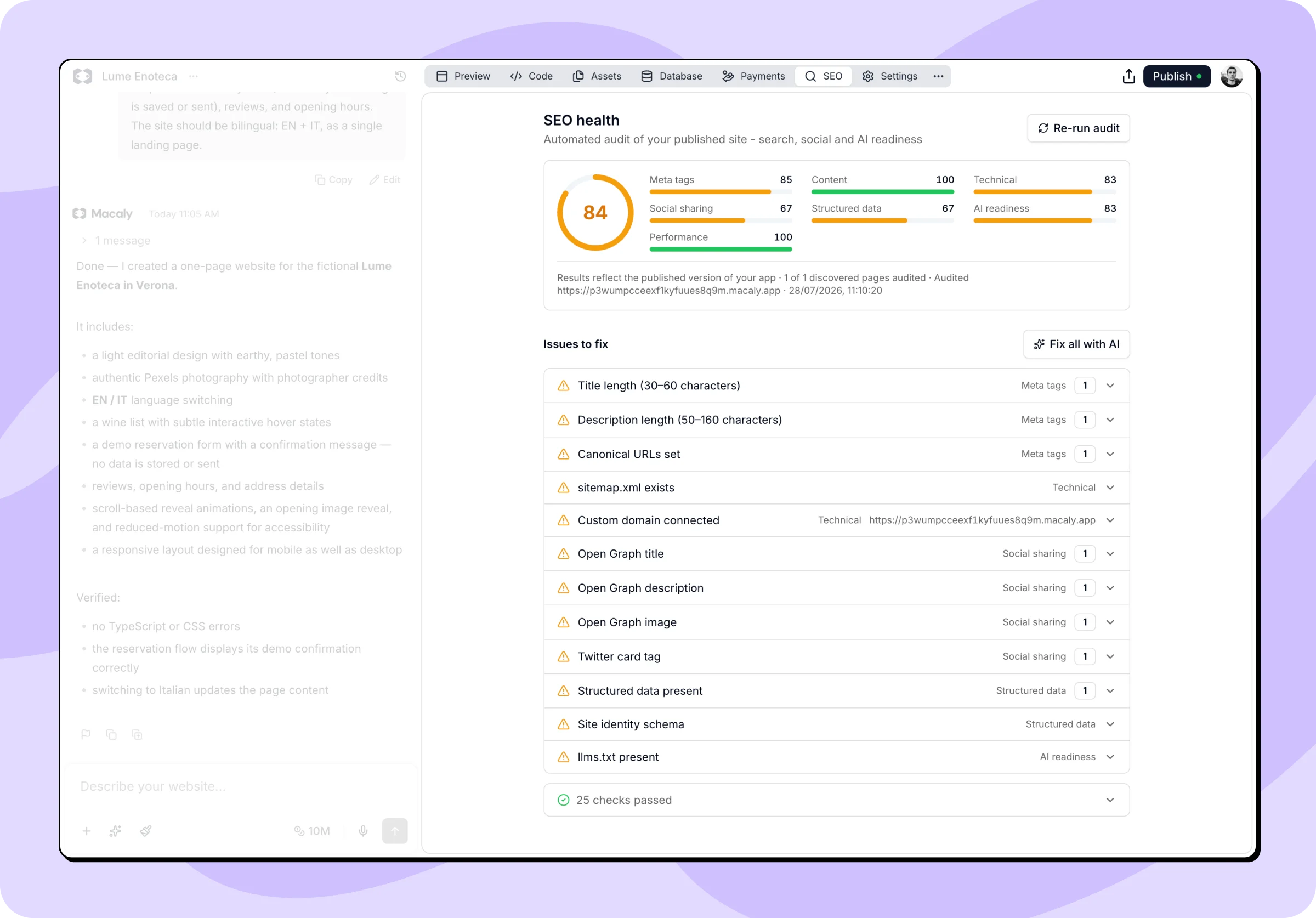
The SEO tab in your chat holds the SEO health audit, which checks your published site exactly the way search engines and AI crawlers see it, scores it, and tells you what to improve.
When the audit runs
The audit runs automatically every time you publish your changes. Macaly re-checks your published site and updates the results.
If you make changes without publishing them, the audit warns you that your project has changed since the last publish. Publish it again to see up-to-date results. You can then also run the audit manually.
Reading your score
At the top, you’ll see an overall score and a breakdown across seven categories:
- Meta tags: Titles, descriptions, canonical URLs, and other page metadata.
- Content: Headings, image alt text, and whether pages have enough text.
- Technical: Sitemap, robots.txt file, broken links, and custom domain.
- Social sharing: Open Graph tags, favicon, and preview images.
- Structured data: JSON-LD schema that helps search engines understand your site.
- AI readiness: How well AI crawlers can access and understand your content.
- Performance: Loading speed and stability (measured with PageSpeed Insights).
Each category has its own score so you can see at a glance where you’re strong and where there’s room to improve. Green means everything is in good shape, amber means there’s room to improve, and red flags something worth your attention right away.
Issues to fix
Below the overall score you’ll find the list of issues. Each one shows which category it belongs to and how many pages it affects.
Issues come in two levels:
- Errors (red) are more serious problems that can hold your site back, like a missing title or very slow loading.
- Warnings (amber) are recommendations that make your site stronger, like a title that’s outside the ideal length or a missing social sharing image.
Checks that came back clean sit at the bottom of the list, so it stays focused on what actually needs your attention.
Fixing issues with AI
You don’t have to fix issues by hand. Macaly can send them straight to the agent in your chat.
- Fix all with AI hands the full list of issues to the agent at once. It works through them together and applies the changes.
- Fix on an individual issue sends just that issue to the agent.
Once the agent is done, publish your project again so the audit re-checks your published site and updates the results.
Fixes are made by the agent in your chat, so they use credits like any other request. Running the audit itself is free and doesn't count toward any limits.
Search appearance
At the bottom of the SEO tab in your chat, you’ll find a list of every page in your project along with the title and description it uses in Google search results.
Each page appears as a search result preview, so you can see the title, the description, and the image people get when the link is shared.
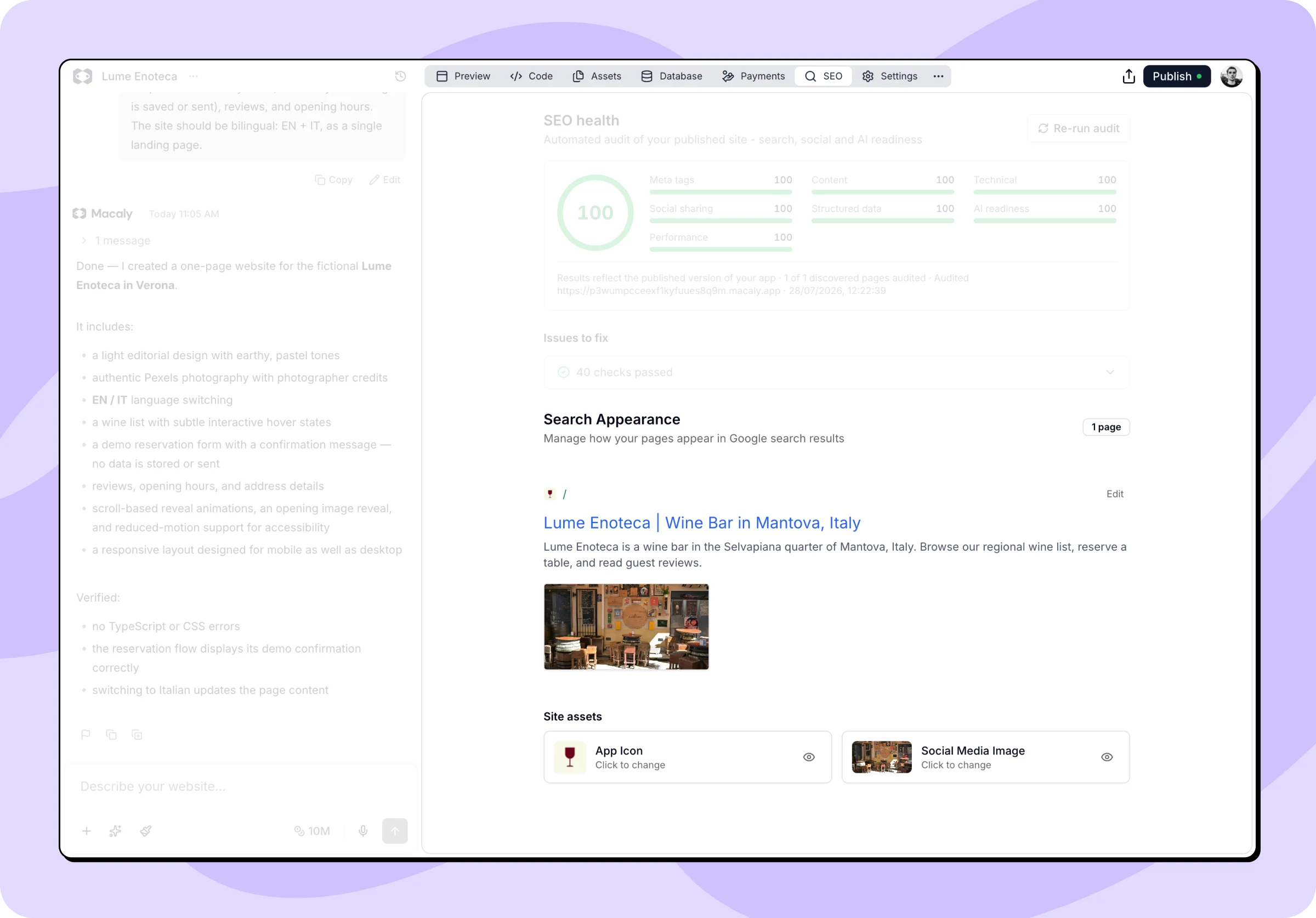
Pages that come from dynamic paths, such as a blog post template, are listed separately as read-only. Their metadata is generated by your code, so ask the agent if you need to change it.
Editing a page
Click Edit on a page to open its settings:
- Title: The headline shown in search results.
- Description: The text below the title.
Social Media Preview on the right updates as you make changes, showing how the page will look when shared. Use Upload to add your own image, or Reset to go back to the original one. Images can be PNG, JPG, or GIF, up to 5MB, ideally at 1200×630px.
Click Save Changes when you’re done. If the agent is working, editing is paused.
Titles and descriptions have no length limit, but the SEO audit flags titles outside the 30–60 character range and descriptions outside 50–160 characters as issues. Saving writes the changes into your project, so publish them to reach your published site and the next audit.
Site assets
Two assets are used across your whole site:
- App Icon (favicon): The small icon shown in browser tabs and bookmarks. Accepts ICO or SVG files up to 100KB.
- Social Media Image: The default image used when your site is shared. Accepts PNG, JPG, or GIF up to 5MB, ideally 1200×630px. Pages that don’t have their own image use this one.
Click either card to upload a new image, or the eye icon to view the current file. When one of the images is missing, a Generate button appears next to the heading and asks the agent to create it from your project.
Setting up SEO for the first time
If your project has no metadata yet, you’ll see a Set up SEO button instead of the page list. It asks the agent to write titles and descriptions for your existing pages and to add an app icon and social media image.
Frequently asked questions
How does Macaly handle SEO?
Macaly builds search-engine-friendly sites. Server-side rendering, clean HTML, and meta tags are all handled by Macaly for you. Once you publish your project, the SEO audit scores your site and tells you what to improve. You can also edit meta tags, page titles, and descriptions in Settings → SEO.
Why can’t I run the SEO audit?
The audit only checks your site after you publish. If you haven’t published your project yet, publish it and the audit will run automatically.
My SEO audit looks out of date. Why?
The audit reflects your last published version. If you’ve changed something since then, publish your project again and the audit results will refresh.
What is AI readiness?
AI readiness measures how well AI crawlers, such as those from ChatGPT, Claude, or Perplexity, can reach your site and understand it. It checks that your content is on the page itself rather than loaded with JavaScript, that AI crawlers aren’t blocked, and that an llms.txt file is available to guide them. Macaly renders your pages on the server automatically.
How do I improve my SEO score?
Work through the list of issues, errors first, then warnings. Either use the Fix all with AI button and hand the agent every issue at once, or work through them one by one. Then publish your changes and the score updates on the next audit.
My site is not appearing in Google search. What can I do?
Google indexing takes a while, often days to weeks. To speed it up, submit your site URL to Google Search Console at search.google.com/search-console. You can also share your URL on social media, since Google crawls links it finds elsewhere on the web.
Can I embed a Macaly site in another website using an iframe?
Technically yes, using your published Macaly URL in an iframe. However, content inside iframes is poorly indexed by search engines, which has a negative impact on your SEO. A better approach is to use Macaly as a standalone site with its own custom domain.
If you have any further questions, simply raise a support request from within your Online Control Panel or call us on 0345 363 3633. Our customer Care team is here to help and ready to assist you with your enquiry.